Solana Fees: Transaction Cost, Priority Fees, and Compute Units
Learn how Solana transaction fees work, including base fees, priority fees, compute units, fee calculation, CU limits, and production fee strategy.
How much does a Solana transaction really cost when the app has to account for priority fees, compute budget, account creation, and failed retries? Solana fees consist of a mandatory base fee and an optional priority fee. The base fee is 5,000 lamports per signature. The priority fee depends on compute unit price and requested compute unit limit. For a typical one-signature transaction with no priority fee, the total network cost is 0.000005 SOL.
For backend engineers and teams running transaction-heavy workloads — swaps, payments, trading bots, mints, DeFi apps — that single number rarely describes the real transaction cost. A Solana transaction can also involve account creation costs, DEX routing fees, app-level charges, and slippage, none of which are network gas. And the practical question isn't only what a transaction costs, but how to set fees so transactions land reliably without overpaying.
To make Solana fees useful in production, it helps to separate three things: the network fee, the full user-facing cost, and the fee strategy used to get transactions landed reliably.
What Solana Fees Actually Include
A user-facing transaction cost can include several layers. Only two of them are Solana network fees: the base fee and the priority fee. Everything else — DEX fees, wallet charges, account creation, slippage, bundle tips — sits at a different layer.
| Cost type | Paid to | When it appears | Part of Solana network fee? |
|---|---|---|---|
| Base fee | Burn + validator | Every transaction | Yes |
| Priority fee | Validator | When set by wallet/app/user | Yes |
| Rent / account creation | Account storage requirement | Creating new accounts | No |
| DEX / protocol fee | App/protocol | Swaps, DeFi actions | No |
| Wallet service fee | Wallet/app | Depends on product | No |
| Exchange withdrawal fee | Exchange | CEX withdrawals | No |
| Slippage / price impact | Market effect | Swaps / trading | No |
| Bundle tip | Validator / relay | Jito-style execution paths | No |
If a first token transfer costs more than expected, the extra cost is usually account creation, not network gas. Phantom creates the recipient's associated token account automatically when needed, and that storage deposit can dwarf the base fee itself.
For the rest of this article, "network fee" means base fee plus priority fee. Rent, DEX fees, wallet fees, and slippage still matter for the user, but they should be calculated and displayed separately.
How Much Does a USDC Transfer Cost on Solana?
A standard USDC transfer on Solana pays the same Solana network fees as other transactions: the base fee plus any optional priority fee. For a typical one-signature USDC transfer to an existing recipient token account, the network fee is 5,000 lamports, or 0.000005 SOL, when no priority fee is set. There is no separate Solana network fee just because the transferred asset is USDC.
If the recipient does not yet have an associated token account for USDC, the transaction can create one before completing the transfer. In that case, the payer must also fund the new token account's rent-exempt balance. That account-creation cost is separate from the Solana transaction fee and can be much larger than the 5,000-lamport base fee.
How to Calculate a Solana Transaction Fee
total_network_fee = base_fee + priority_fee
base_fee = number_of_signatures × 5,000 lamports
priority_fee = ceil(compute_unit_price × compute_unit_limit / 1,000,000)
Unit conversions:
1 SOL     = 1,000,000,000 lamports
1 lamport = 1,000,000 micro-lamports
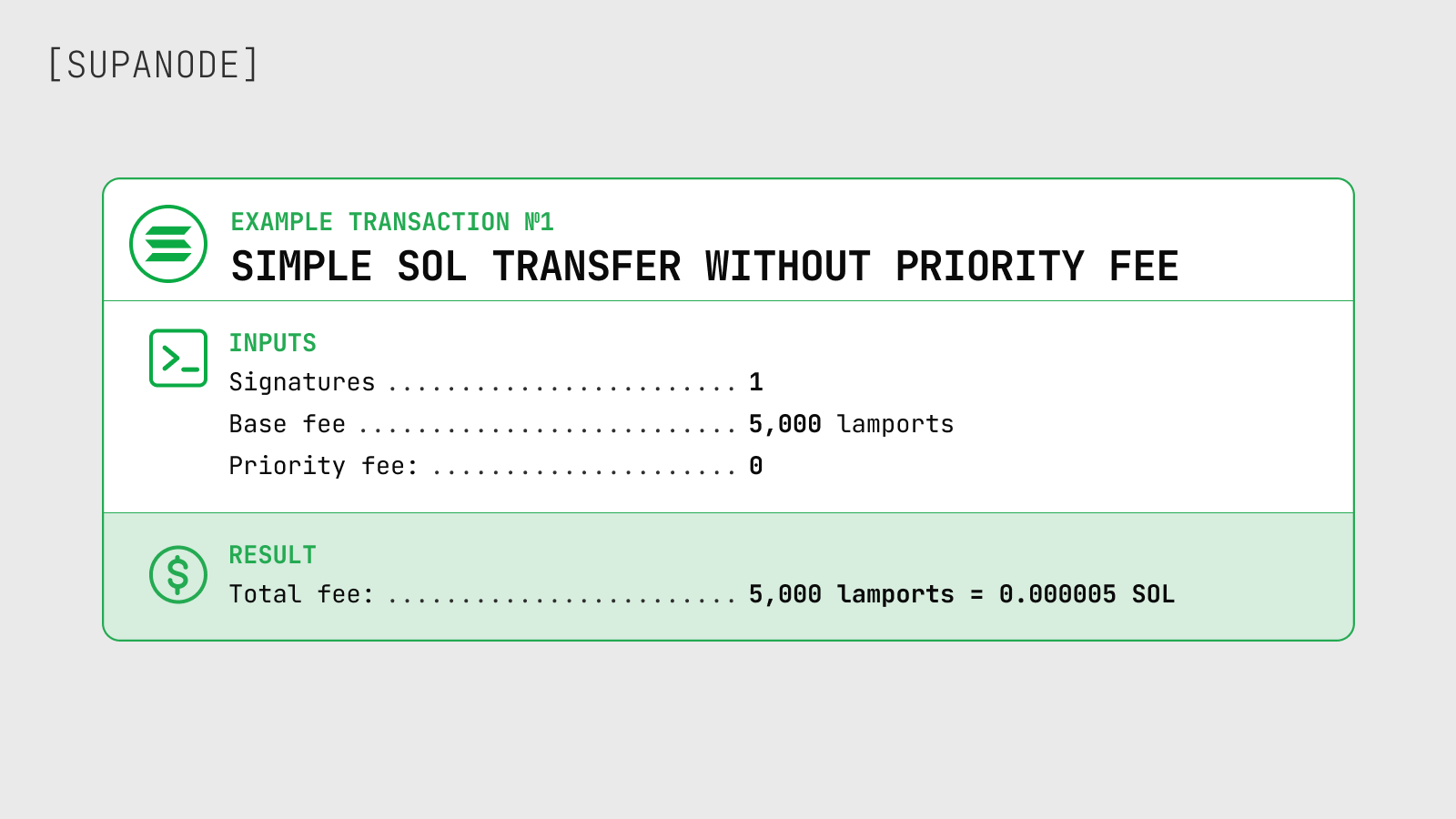
Example 1 — simple SOL transfer, no priority fee:
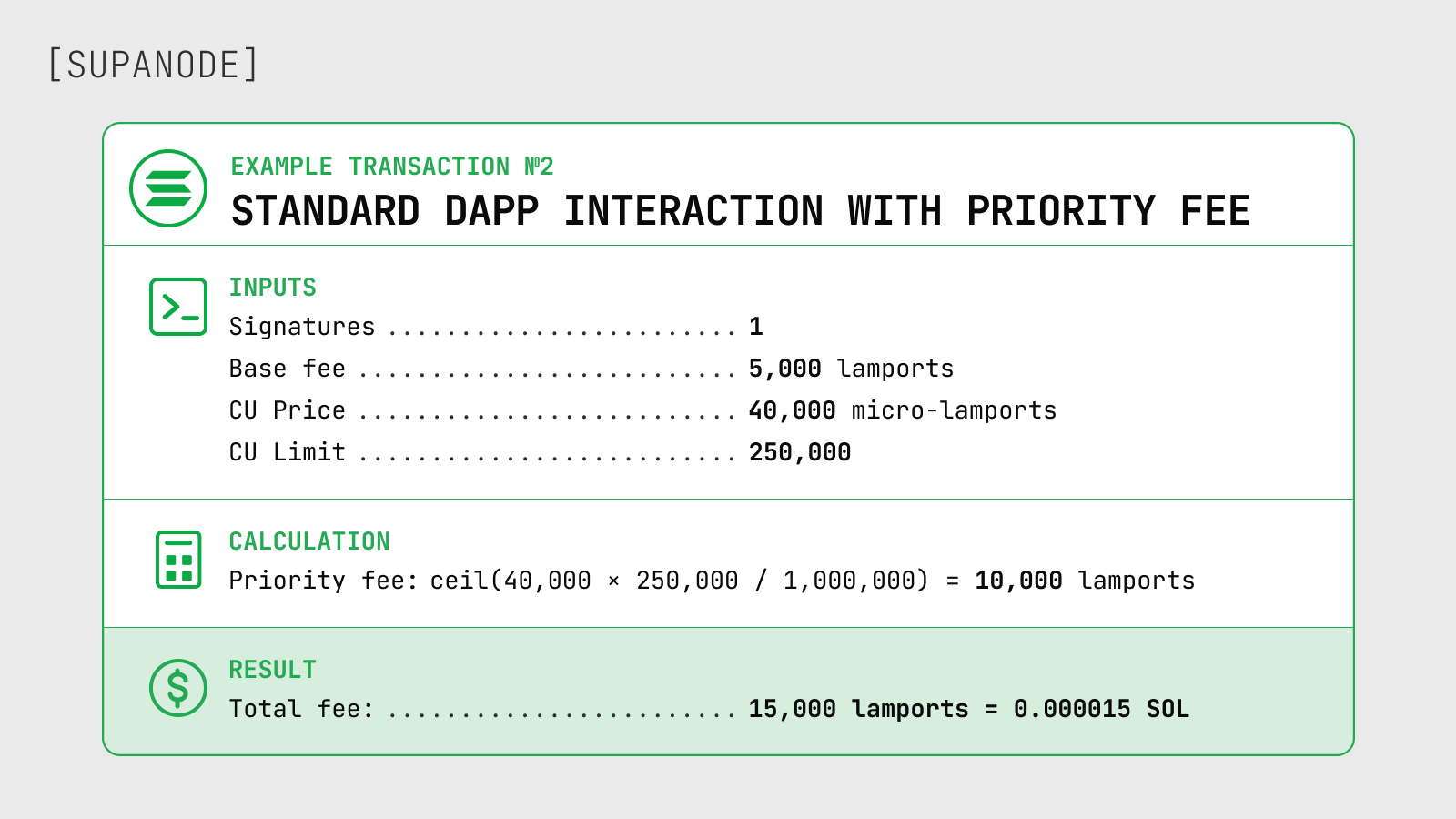
Example 2 — standard dApp interaction with priority fee:
Example 3 — high-urgency swap or mint transaction:
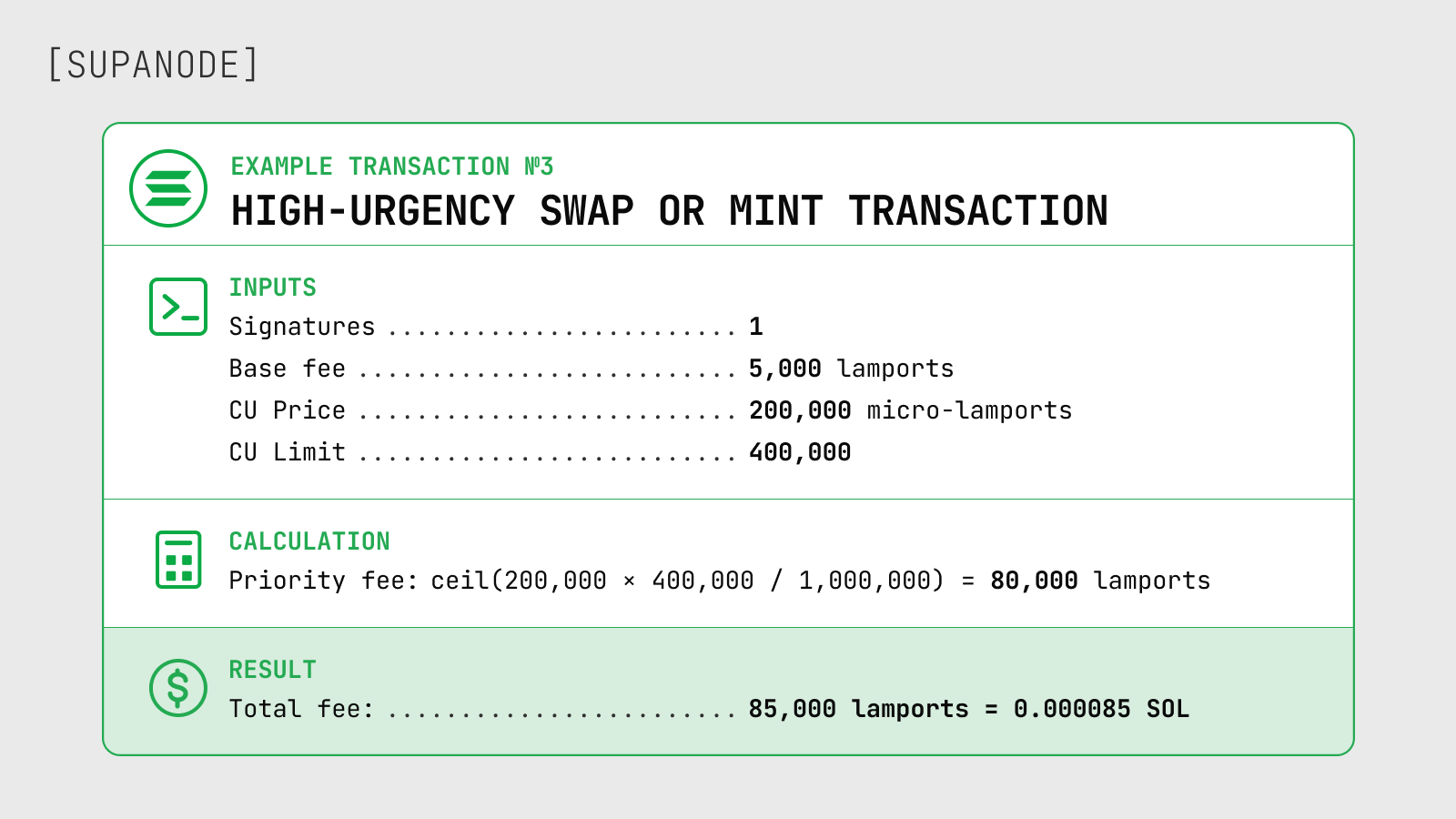
These are illustrative examples. Competitive priority fee levels vary by time, workload, and account contention — the next sections cover how to estimate them for production.
Solana Base Fee: The Predictable Part
The base fee is the fixed per-signature cost every Solana transaction pays: 5,000 lamports per signature. For one signer, that is 0.000005 SOL; for three signers, 15,000 lamports before priority fees.
Three details that matter in practice:
- The base fee is charged even if the transaction fails. The validator processed it; they get paid regardless.
- The base fee is set by protocol, not auctioned per block. It doesn't spike when the network is busy — that's what priority fees handle.
- Users sometimes call this "Solana gas fees," which is a reasonable shorthand. The model is base fee plus optional priority component, not a unified gas auction.
Solana base fees are low because the architecture handles throughput through parallelization and a high-performance runtime rather than artificial blockspace scarcity. The base fee covers signature verification and basic processing costs, not a congestion-clearing mechanism.
Solana Priority Fees: The Variable Part
The protocol does not require a priority fee. Production apps often do.
Attaching a priority fee signals to the validator that a transaction is willing to pay more to be scheduled sooner. The fee is denominated in micro-lamports per compute unit and goes 100% to the validator — this changed with SIMD-0096, which removed the previous partial burn on priority fees.
The formula:
priority_fee = ceil(compute_unit_price × compute_unit_limit / 1,000,000)
So with a compute unit price of 50,000 micro-lamports and a requested compute unit limit of 300,000 CUs:
priority_fee = ceil(50,000 × 300,000 / 1,000,000) = 15,000 lamports = 0.000015 SOL
Adding the base fee:
total network fee = 5,000 + 15,000 = 20,000 lamports = 0.00002 SOL
The priority fee uses the requested compute unit limit, not the compute actually consumed during execution. That distinction is responsible for a lot of wasted spend in production apps — covered more in the compute units section below.
A higher priority fee improves scheduling probability. It doesn't guarantee the transaction lands.
Compute Units: Why Fee Calculators Can Be Misleading
Compute units measure how much execution work a transaction requires. Every transaction has a compute budget, and priority fees are charged on the requested CU limit — not actual usage. If an app requests 600,000 CUs but only uses 180,000, it's paying priority fees on 600,000.
Current runtime defaults:
Default CU limit per non-builtin instruction:     200,000 CUs

Default CU limit per builtin instruction:           3,000 CUs  (updated with SIMD-0170)
Maximum CU limit per transaction:               1,400,000 CUs
The 3,000 CU default for builtin instructions reflects a recent protocol update — older documentation and third-party guides sometimes still show higher values.
How this plays out in practice:
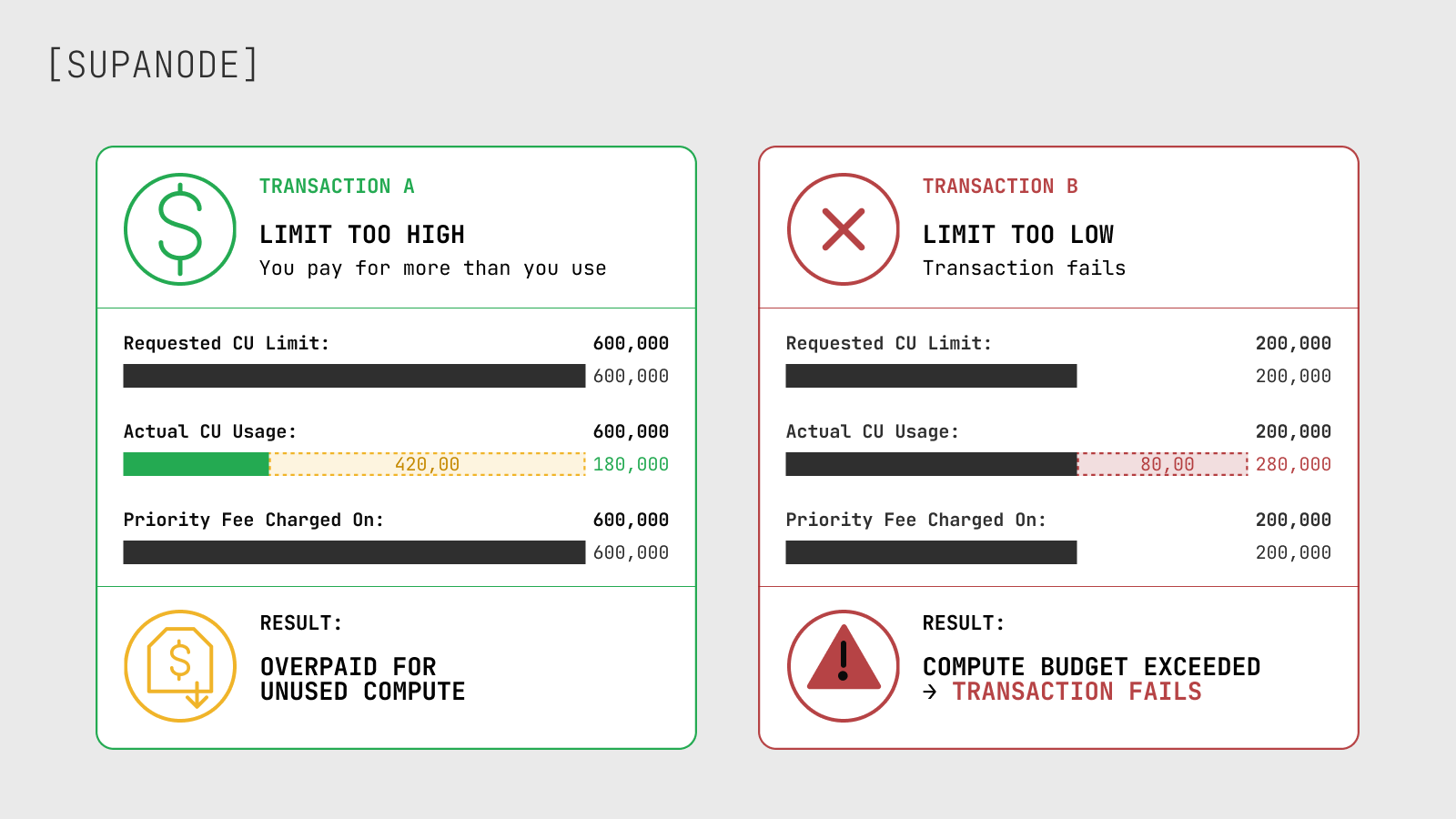
Simulate first, then set a controlled margin — around 10% over observed simulation usage is a reasonable starting point. Leaner transactions can pay less and still rank better in the scheduler.
For complex transactions — swaps, vault interactions, cross-program invocations — CU estimation matters more because CPIs run inside the parent program's compute budget, and loaded account data has its own cost in the scheduler model. Solana's scheduler ranks transactions by reward relative to estimated cost, so a transaction loading unnecessary account data can rank worse than a leaner one at the same CU price.
Solana Fee Calculator vs Priority Fee Tracker
These are different tools answering different questions, and treating them as interchangeable causes real bugs in production fee logic.
A fee calculator answers: what will this transaction cost given this CU limit and CU price? Deterministic math — signatures, CU limit, CU price, unit conversions.
A priority fee tracker answers: what CU price might be competitive right now? It samples recent blocks, aggregates into percentile bands, and gives a market estimate. Values change constantly.
For production apps, both are necessary:
fee calculation + dynamic priority fee estimation + transaction landing monitoring
getRecentPrioritizationFees can be too weak as a market signal during congested workloads — it often reflects low or near-zero samples from recent blocks and may not represent what's actually needed to land on a contested account. For workloads competing on hot programs or accounts, percentile-based estimates from a provider API tend to give a more actionable read.
Solana's fee market is also local to account contention, not a single global number. The same RPC method accepts writable locked accounts as a filter, which means estimates for a hot AMM pool state account look very different from a quiet transfer with no contested accounts. Passing relevant writable accounts — pool state, reserves, user token accounts — gives a more accurate read than relying on a global average.
What a Solana Fee Calculator Should Account For
Most fee calculators online only convert SOL to USD or let you adjust a CU price slider. That's a start, but a production-useful calculator needs more inputs.
At minimum, a calculator should ask for:
- Number of signatures — base fee scales with each signer
- Requested compute unit limit — priority fee is charged on this number, not actual usage
- Compute unit price in micro-lamports — from a live estimate or manual input
- Whether new accounts are being created — rent-exempt deposits are separate and often larger than the network fee itself
- Whether protocol or app fees apply — DEX fees, routing fees, and wallet service charges are not Solana network fees
A calculator that only handles the first three gives a correct network fee. One that ignores the last two gives an incomplete picture of what the user actually pays.
The distinction also matters for display: surfacing protocol fee, rent deposit, and app fee as separate line items builds more trust than collapsing everything into a single "transaction fee" number.
How to Estimate Solana Priority Fees in Production
Fixed priority fees are fragile. They overpay during calm periods and undershoot during spikes.
The recommended sequence for production fee estimation:
- Build the intended transaction instructions
- Simulate with a deliberately high CU limit to observe actual usage
- Set
requested_cu_limit = ceil(unitsConsumed × 1.10) - Identify the writable state accounts involved
- Pull local priority fee samples filtered to those accounts, or use a percentile-based estimate
- Choose a percentile tier based on urgency
- Assemble with
SetComputeUnitLimit+SetComputeUnitPrice - Call
getFeeForMessageas a final protocol-fee sanity check - Send with a fresh blockhash and explicit retry/expiry logic
Different workloads warrant different approaches:
| Workload | Fee approach |
|---|---|
| Simple wallet transfer | Base fee or minimal priority may be sufficient |
| Standard app interaction | Dynamic low/medium estimate |
| Swap / DeFi action | Dynamic estimate + CU simulation |
| Mint / launch event | Higher percentile estimate, strict retry discipline |
| Trading bot / arbitrage | Workload-specific bidding, TPU path, blockhash handling |
| Backend batch jobs | Cost-controlled priority with landing monitoring |
Blindly using the highest fee tier wastes money without fixing routing problems, stale blockhash, account contention, or CU budget errors — any of which can drop or fail a transaction regardless of bid level.
Setting Compute Budget Instructions: A Short Example
The core pattern for setting compute budget in @solana/web3.js looks like this:
import { ComputeBudgetProgram, TransactionMessage, VersionedTransaction } from "@solana/web3.js";
// Step 1: simulate to get actual CU usage, then add margin
const cuLimit = Math.ceil(unitsConsumedFromSimulation * 1.10);
// Step 2: fetch a priority fee estimate for your writable accounts
// (use getRecentPrioritizationFees filtered to writable accounts,
//  or a percentile-based estimate from your provider)
const cuPriceMicroLamports = 140_000; // replace with dynamic estimate
// Step 3: build the final transaction with budget instructions

const instructions = [
 ComputeBudgetProgram.setComputeUnitLimit({ units: cuLimit }),
 ComputeBudgetProgram.setComputeUnitPrice({ microLamports: cuPriceMicroLamports }),
 ...yourAppInstructions,
];
const message = new TransactionMessage({
 payerKey: payer.publicKey,
 recentBlockhash: latestBlockhash,
 instructions,
}).compileToV0Message();
const tx = new VersionedTransaction(message);
Only one instruction of each compute-budget variant is allowed per transaction. Duplicate SetComputeUnitLimit or SetComputeUnitPrice instructions cause a DuplicateInstruction error. If the stack includes wallet middleware or a relayer that also injects compute-budget instructions, normalize them in one place before signing.
After building the final message, calling getFeeForMessage lets the cluster quote the exact protocol fee before submission — useful as a sanity check, especially for transactions with multiple signers or variable compute budgets.
Why Higher Fees Don't Always Fix Failed Transactions
A transaction can fail for reasons a higher priority fee cannot touch:
- Compute budget exceeded — actual usage went past the requested CU limit
- Blockhash expired — roughly 150 blocks, ~60 seconds; the transaction arrived stale
- Account state changed between construction and execution
- Slippage exceeded — common in swaps with tight tolerance settings
- Account in use / lock contention — another transaction held the same writable account
- Transaction dropped before reaching the leader, often due to RPC routing or latency
- Preflight mismatch — simulation succeeded but live conditions had shifted
- Retry misconfiguration — rebroadcasting with a blockhash that had already expired
These fail differently:
| Problem | Meaning | Fee relevance |
|---|---|---|
| Failed transaction | Processed but execution failed | Fee can still be charged |
| Dropped transaction | Never reached execution | Priority fee may help; routing also matters |
| Expired transaction | Blockhash expired before inclusion | Blockhash handling, not fee level |
| Delayed confirmation | Lands slowly or inconsistently | Fee, RPC, routing, retries all contribute |
For high-volume apps, the cost of failed transactions accumulates — particularly if retry logic keeps resubmitting transactions that will fail regardless of bid price. Tracking failed, dropped, expired, and delayed transactions separately is the only way to diagnose which problem is actually happening.
Solana Fees and Transaction Landing
In production, fee strategy only works when the transaction path works too. RPC provider pricing is separate from Solana network transaction fees: it is infrastructure cost, not a fee charged by the Solana protocol.
A complete transaction landing stack involves fresh blockhash management, a realistic CU limit from simulation, a dynamic CU price from local percentile estimation, a clear preflight and simulation policy, explicit retry rules with expiry boundaries, RPC latency monitoring, and confirmation tracking by transaction type.
In infrastructure work with Solana teams, we often see the same pattern: priority fees go up, confirmation stays inconsistent, and the actual problem is elsewhere — the transaction reaching the leader too late, the RPC endpoint rate-limited under load, blockhashes close to expiry before submission, or retry logic firing with stale data. Fee level didn't cause those failures and raising it further doesn't resolve them.
The gap is most visible in latency-sensitive workloads — trading, arbitrage, liquidations, and mints under load. Teams with well-tuned RPC paths and blockhash refresh logic consistently outperform teams compensating with higher fees.
If an app is already estimating priority fees correctly and landing is still inconsistent, the bottleneck is probably in the transaction path — RPC latency, routing, blockhash handling, or retry logic. That's a different problem than fee calibration, and treating it as a fee problem keeps it from being diagnosed properly. More on that in the Solana transaction landing guide and the Solana RPC infrastructure guide.
Common Mistakes With Solana Fees
The same fee mistakes show up again and again:
Treating base fee as the full cost. A 5,000-lamport base fee says nothing about what a swap or first-touch interaction will actually cost once priority fees, account creation, and app fees are included.
Using a fixed priority fee permanently. Static fees overpay during quiet periods and undershoot during congestion. Dynamic estimation per transaction class handles both cases better.
Setting CU limit too high. Priority fees are charged on the requested limit. Excessive headroom increases cost and signals a larger scheduler cost that can affect priority ranking.
Setting CU limit too low. Transactions fail if actual compute usage exceeds the limit. Simulation before setting the limit is the practical fix.
Assuming priority fee covers all failure modes. It covers scheduling priority. It doesn't address compute overruns, stale blockhash, dropped packets, routing problems, or lock contention.
Ignoring the cost of failed transactions. At volume, this becomes a real budget line — particularly if retry logic keeps resubmitting transactions that will fail regardless.
Comparing only average fees. Average network fee across all transactions is close to meaningless for diagnosis. Transfers, swaps, mints, and backend jobs have different cost and failure profiles and need to be tracked separately.
Production Checklist for Solana Fee Strategy
Before shipping or reviewing a Solana transaction flow:
- Separate network fee, app fee, wallet fee, rent, and exchange withdrawal fee in any user-facing cost display
- Calculate base fee from actual signature count
- Simulate transactions to observe CU usage before setting limits
- Add a controlled margin (~10%) over observed simulation usage
- Use dynamic priority fee estimates filtered to relevant writable accounts
- Apply different fee tiers to different transaction types based on urgency
- Avoid duplicate compute-budget instructions across middleware, wallet, and app layers
- Track total fee paid and landing rate per transaction class
- Track failed, dropped, expired, and delayed transactions as separate categories
- Monitor confirmation latency alongside fee spend
- Review blockhash freshness logic and retry expiry boundaries
- Check whether raising fees actually improves landing rate before raising further
- If high fees aren't improving landing, investigate RPC path, routing, and transaction construction before adjusting the fee
So how much does a Solana transaction really cost? At the network level, it is base fee plus priority fee. In production, the real cost also includes the compute limit you request, account creation deposits, protocol or app-level charges, failed retries, expired blockhashes, and the infrastructure path used to get the transaction landed. If fees are tuned correctly but transactions still fail, delay, or expire under load, the bottleneck is likely in the transaction path. Supanode works with Solana teams on low-latency RPC infrastructure, transaction routing, and workload-specific reliability monitoring for production workloads.