Solana API Guide: RPC Methods, Endpoints, and Examples
Learn how Solana API access works through RPC endpoints, JSON-RPC methods, WebSocket subscriptions, SDKs, API keys, and production setups.
Solana's ecosystem moves fast, and one thing we have noticed while running infrastructure and integrating with protocols is that "Solana API" means different things depending on who is asking.
For a frontend developer, it may mean a Solana RPC endpoint URL. For a backend engineer, it usually means JSON-RPC methods like getAccountInfo, getTransaction, or sendTransaction. For an infra lead, it means the full production access stack: API keys, private endpoints, WebSocket subscriptions, commitment levels, rate limits, fallback logic, and sometimes indexing or streaming infrastructure.
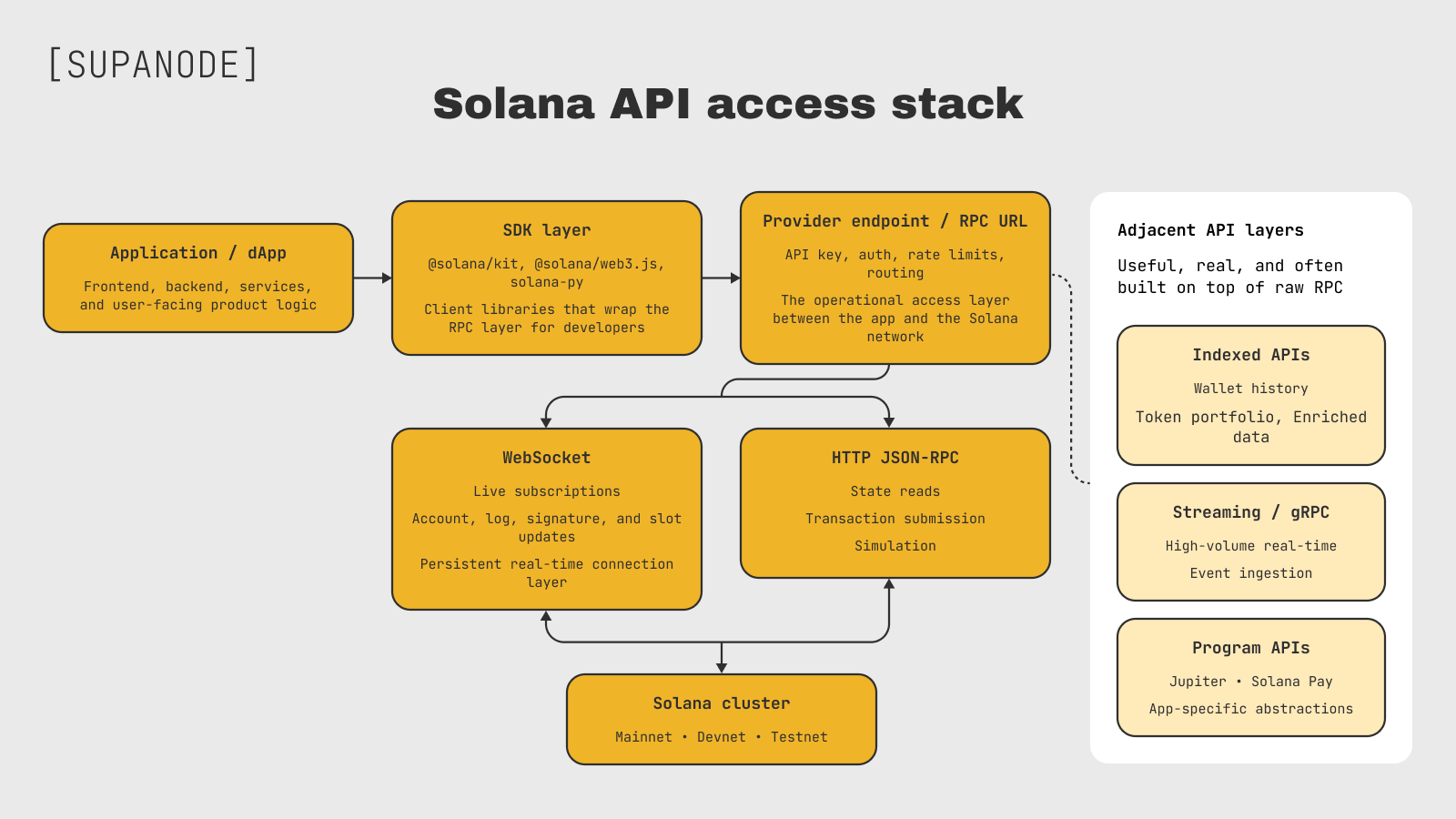
Solana API access is a layered architecture.
This guide is for developers who have moved past the quickstart phase and need to understand how Solana API access actually works in production: how RPC endpoints are used, where API keys fit, which methods matter, why public RPC breaks under real traffic, and when private or dedicated RPC becomes necessary.
In short: the Solana API is usually accessed through RPC endpoints. Developers use HTTP JSON-RPC methods for state reads and transaction submission, WebSocket subscriptions for live updates, SDKs like @solana/kit for client-side integration, and provider API keys for private or managed infrastructure access.
What "Solana API" actually means
The term gets used loosely. When developers say "Solana API," they might mean any of the following:
- The JSON-RPC interface — the core protocol, HTTP POST requests with a standard JSON-RPC 2.0 envelope, used to read chain state or submit transactions
- An RPC endpoint URL — like
https://api.mainnet-beta.solana.comor a provider-specific URL with an embedded API key - WebSocket subscriptions — a parallel real-time interface (
wss://) for account updates, log streams, and slot changes - Client SDKs —
@solana/kit(current recommended) or the older@solana/web3.js, which wrap the RPC layer - Provider API keys — credentials issued by managed RPC providers; embedded in the endpoint URL, not a Solana protocol concept
A Solana API key is usually not a protocol-level key. It is a provider credential. Public RPC endpoints may work without a key, but managed providers issue API keys to meter usage, apply rate limits, separate customers, and route traffic through private infrastructure. The key is often embedded in the RPC endpoint URL, though some providers use header-based auth or a separate credential model — check the provider's current docs.
- Indexed or enriched APIs — higher-level REST services that aggregate and decode on-chain data (wallet history, token portfolios, NFT metadata); built on top of raw RPC but distinct from it
- Protocol- and application-specific APIs — like Jupiter API integration or Solana Pay developer infrastructure, which provide higher-level interfaces for specific protocols or application flows built on Solana
For mainnet access, the endpoint matters. A mainnet RPC endpoint connects your application to live Solana state and real transactions. Devnet and local validator are safer for testing, but production apps eventually need stable mainnet access through a private or dedicated endpoint rather than relying on shared public RPC.
This guide focuses on the RPC layer and production infrastructure. The indexed and program-specific layers are real and useful — we'll reference them where relevant — but the RPC access model is the foundation everything else is built on.
How the Solana RPC API works
The most common way to use the Solana API is through the Solana RPC API. RPC nodes expose an HTTP JSON-RPC 2.0 endpoint for request-response calls and a WebSocket endpoint for subscriptions. Together, these interfaces let applications read chain state, submit transactions, simulate execution, and track live updates.
Commitment levels control how finalized a result has to be before it's returned. The options are processed, confirmed, and finalized — in increasing order of safety. processed gives you the newest state but it could still roll back. finalized is the strongest guarantee. The default, if you omit the commitment parameter, is typically finalized. For transaction submission and anything involving real value, be explicit about this.
The Solana RPC infrastructure overview covers the full method reference, but the methods developers actually reach for in day-to-day work are a much shorter list — covered below.
Solana API example: a basic JSON-RPC request
At the lowest level, a Solana API call is just a JSON-RPC request sent to an RPC endpoint. SDKs hide this format most of the time, but understanding the raw request helps when debugging provider errors, rate limits, and method parameters.
curl https://api.devnet.solana.com \
-X POST \
-H "Content-Type: application/json" \
-d '{
"jsonrpc": "2.0",
"id": 1,
"method": "getSlot",
"params": []
}'
This is the raw format SDKs usually hide. The endpoint selects the cluster, the method selects the RPC call, and the params array carries method-specific arguments. For methods with no arguments, an empty array is valid.
Solana RPC endpoints: mainnet, devnet, and testnet
Endpoint selection determines which cluster you're talking to. The public Solana RPC endpoints are:
- Mainnet:
https://api.mainnet-beta.solana.com(also documented ashttps://api.mainnet.solana.com) — production, real SOL, real stakes. Both URLs appear in official Solana docs depending on context; check your provider's current recommended endpoint - Devnet:
https://api.devnet.solana.com— testing, free SOL via faucet, safe to experiment - Testnet:
https://api.testnet.solana.com— mostly for validator and network-level testing, less relevant for most app developers - Local:
http://localhost:8899(HTTP) andws://localhost:8900(WebSocket) — when runningsolana-test-validatorlocally
For early testing, devnet is the right starting point. Use the Solana devnet faucet to get tokens. Local validator is better for tight iteration loops — no network latency, full control over state.
The WebSocket endpoints mirror the HTTP ones (swap https:// for wss:// ). Same cluster, different interface. For production apps, mainnet is where endpoint reliability starts to matter — shared public access is fine for scripts and testing, but user-facing traffic needs something more stable. For more on endpoint configuration and provider-specific setup, the Solana RPC endpoint guide goes deeper.
Public RPC vs private RPC vs dedicated RPC
The public RPC endpoints are fine for development. They are not production infrastructure.
Solana's own docs are direct about this: shared public endpoints are not intended for production applications. The failure modes are predictable — 429 Too Many Requests when you exceed rate limits, 403 Forbidden if your IP gets flagged for aggressive traffic. Under real user load, you will hit them.
Provider plans usually define explicit limits by requests per second, monthly credits, method weight, WebSocket connections, or compute-unit style pricing. These limits change over time, so teams should check the current plan details before launch and monitor real usage after deployment.
When you start hitting limits during normal operation, or when RPC latency directly affects user experience, you have outgrown the current tier.
| RPC setup | Best for | Traffic profile | Failure modes | Control level | Production fit |
|---|---|---|---|---|---|
| Public RPC | tutorials, local scripts, prototypes | low, irregular, non-user-facing | 429, 403, unstable latency, changing limits | none | no |
| Private/shared provider RPC | MVPs, small/mid dApps, normal app traffic | moderate, predictable, API-key gated | plan limits, burst throttling, shared backend contention | medium | yes, starting point |
| Dedicated RPC | high-volume apps, trading infra, latency-sensitive backends | sustained, bursty, production-critical | capacity planning, cost, provider/node ops | high | yes, best for critical workloads |
Public RPC works for testing, but production apps need predictable throughput, private access, and a clear reliability model. For production workloads, compare Supanode's production Solana RPC service.
Common Solana RPC methods developers use
The full RPC method list is long. The methods that show up in real applications are a much shorter set.
| Method | What it is used for | Production note |
|---|---|---|
getAccountInfo | Fetch one account's state, data, and metadata | Good for point reads |
getMultipleAccounts | Fetch multiple accounts in one request | Better than many separate reads |
getProgramAccounts | Fetch accounts owned by a program, optionally with filters | Can be expensive at scale and may be throttled |
getBalance | Read SOL balance for an address | Simple account-level read |
getTokenAccountBalance | Read SPL token balance for a token account | Useful for token-aware apps |
getLatestBlockhash | Get a fresh blockhash before building a transaction | Required before transaction submission |
sendTransaction | Submit a signed transaction | Acceptance is not confirmation |
simulateTransaction | Dry-run a transaction before sending | Useful for debugging and preflight checks |
getTransaction | Fetch a confirmed transaction by signature | Useful for transaction lookup and debugging |
getHealth | Check whether an RPC node is healthy | Basic signal, not a full monitoring strategy |
getSlot | Read the highest slot seen by the node | Useful for slot lag monitoring |
getRecentPrioritizationFees | Read recent priority fee samples | Useful for fee estimation |
A successful sendTransaction response means the RPC node accepted the transaction for broadcast. It does not mean the transaction executed or finalized. Production apps should track confirmation with getSignatureStatuses, signatureSubscribe, or a dedicated transaction confirmation flow.
Solana API examples with SDKs
Most developers do not send raw JSON-RPC requests manually. They use an SDK that wraps the Solana RPC API and handles request formatting, response parsing, and some client-side ergonomics.
For new TypeScript projects, @solana/kit is the current recommended SDK. The older @solana/web3.js is still common in existing codebases and provider quickstarts, so both patterns matter in production.
Connecting and checking account updates with @solana/kit
import {
  address,
  createSolanaRpc,
  createSolanaRpcSubscriptions,
} from "@solana/kit";

const rpc = createSolanaRpc("http://localhost:8899");
const rpcSubscriptions = createSolanaRpcSubscriptions("ws://localhost:8900");

// Replace this with the account you want to monitor.
// This can be a wallet account, token account, program-owned account, or any valid Solana account address.
const watchedAccount = address("11111111111111111111111111111111");

// One-off HTTP RPC call
const health = await rpc.getHealth().send();
console.log("Node health:", health);

// Persistent WebSocket subscription
const abortController = new AbortController();

const accountNotifications = await rpcSubscriptions
  .accountNotifications(watchedAccount, { commitment: "confirmed" })
  .subscribe({ abortSignal: abortController.signal });

(async () => {
  for await (const notification of accountNotifications) {
    console.log("Account changed:", notification);
  }
})();

// Stop listening when the subscription is no longer needed.
abortController.abort();
This example shows the difference between HTTP RPC and WebSocket subscriptions. getHealth() is a one-off HTTP call. accountNotifications() opens a subscription stream and pushes updates until the subscription is stopped. In a real app, replace watchedAccount with the account your UI or backend needs to monitor.
Fetching SOL balance with @solana/kit
import { address, createSolanaRpc } from "@solana/kit";

const rpc = createSolanaRpc("https://api.mainnet.solana.com");

// Replace this with the wallet or account whose SOL balance you want to read.
const accountAddress = address("11111111111111111111111111111111");

const { value: balanceInLamports } = await rpc
  .getBalance(accountAddress)
  .send();

const balanceInSol = Number(balanceInLamports) / 1_000_000_000;

console.log(`Balance: ${balanceInSol} SOL`);
This is the simplest production-relevant pattern: create an RPC client, point it at an endpoint, and call a method. In real applications, the endpoint would usually be a provider URL with an API key or a private/dedicated RPC endpoint.
For transaction submission, the usual flow is: build the transaction, fetch a recent blockhash, sign the transaction, send it with sendTransaction, and then track finality with getSignatureStatuses or signatureSubscribe. The important production point is that transaction submission and transaction confirmation are separate steps.
Legacy @solana/web3.js with a provider API key
import { Connection } from "@solana/web3.js";

const connection = new Connection(
  "https://solana-devnet.g.alchemy.com/v2/YOUR_ALCHEMY_API_KEY",
  "confirmed"
);

const slot = await connection.getSlot();

console.log("Current slot:", slot);
This older pattern is still common in existing Solana projects and provider quickstarts. The Connection object wraps JSON-RPC calls, while the API key in the URL is the provider's access-control mechanism.
For Python-based setups, the Solana Python RPC API guide covers the equivalent patterns using solana-py.
HTTP RPC vs WebSocket subscriptions
The two interfaces serve different access patterns. Using the wrong one for the job creates unnecessary complexity and reliability problems.
HTTP RPC is stateless request-response. You ask a question, you get an answer. Good for reading account state on demand, submitting transactions, fetching a specific block or transaction, or any periodic background task. The tradeoff is that you only know what changed if you poll, which adds latency and burns request quota.
WebSocket subscriptions are persistent connections that push updates to you. Good for real-time UIs that need to reflect account changes immediately, transaction confirmation tracking, and slot monitoring. Available subscription types include accountSubscribe, logsSubscribe, signatureSubscribe, and slotSubscribe.
A common production mistake is using polling where a subscription would be cleaner, or using WebSocket subscriptions for workloads that actually need a streaming pipeline. Moderate real-time UX can work well with WebSocket. High-volume ingestion usually needs a different layer.
For production systems, WebSocket works well as a real-time notification layer. High-throughput ingestion needs something built for that workload specifically. Reconnect logic, re-subscription, missed-event handling, and fallback reads through HTTP RPC should be part of the design from the start.
For a deeper treatment of Solana WebSocket subscriptions — including connection management and subscription patterns — we cover that separately.
RPC vs indexing vs streaming
Raw RPC is the foundation of Solana API access, but it is not a database, search engine, analytics backend, or full historical data layer. This distinction matters because many teams try to solve every data problem with RPC and only later realize they need indexing or streaming infrastructure.
A few concrete examples of where RPC runs out of road:
Historical data. RPC nodes may retain only a limited window of ledger history, depending on how they are configured. For queryable long-term history at scale — such as a wallet's transaction history or a protocol's activity over the past six months — an indexer or historical data API is usually the better layer. For Solana indexing and historical data, the available approaches range from provider-managed indexing APIs to self-hosted solutions.
Token portfolios and aggregated balances. Computing what tokens a wallet holds and what they're worth requires combining on-chain account data with price feeds and token metadata. RPC gives you raw account bytes. Parsing and enriching that at scale is an indexing problem, not an RPC problem.
High-frequency event ingestion. Trading bots and analytics pipelines that need every transaction or log in real time will hit WebSocket limits quickly. gRPC-based streaming — specifically Yellowstone gRPC — is built for this: lower latency, higher throughput, structured filtering. We have run Yellowstone alongside our validator setup and the reliability difference for high-frequency workloads is meaningful. Solana data streaming covers this layer in more detail.
For anything involving Wrapped SOL / WSOL specifically — where the account model behaves differently from native SOL — the access pattern matters and is worth reading separately.
A rough workload decision guide:
| Workload | Primary layer | Secondary / fallback | Why |
|---|---|---|---|
| Current SOL balance | HTTP RPC | cache for repeated reads | direct current-state read |
| SPL token balance | HTTP RPC | indexed API for portfolio UX | raw balance is simple, portfolio view is not |
| Account state | HTTP RPC | WebSocket if updates are needed | direct account read |
| Program account scan | RPC for small scope | indexer for repeated/large scans | getProgramAccounts gets expensive at scale |
| Transaction submission | private/dedicated HTTP RPC | fallback RPC endpoint | write path needs reliability |
| Transaction confirmation | signatureSubscribe | getSignatureStatuses polling | confirmation is separate from submission |
| Live account updates | WebSocket | HTTP read after reconnect | push-based UX, but reconnects need fallback |
| Program logs in real time | WebSocket for moderate volume | Yellowstone gRPC for high volume | WebSocket is not a full ingestion pipeline |
| Wallet transaction history | indexed API/indexer | RPC only for direct tx lookup | history needs queryable storage |
| Token portfolio with USD values | indexed/enriched API | custom indexer | requires metadata, prices, aggregation |
| Historical dashboard | indexer | warehouse/analytics DB | not an RPC workload |
| Trading/event pipeline | Yellowstone gRPC / streaming | dedicated RPC for tx submission | ingestion and sending are separate paths |
RPC handles current state and transaction workflows. Indexing handles historical and enriched data. Streaming/gRPC handles high-volume real-time ingestion.
Solana API docs vs production API access
Official Solana API docs are the right place to check method parameters, request formats, response fields, and SDK syntax. They are not a production architecture plan.
A production app has to answer additional questions:
- Which endpoint handles user traffic?
- What happens when the app hits rate limits?
- How are WebSocket disconnects handled?
- Which reads are cached?
- Which queries go to an indexer instead of RPC?
- Is transaction submission routed through a reliable endpoint?
- How is slot lag monitored?
- What is the fallback path when the primary RPC endpoint fails?
Production architecture for Solana API access
The teams that run into the most problems are usually the ones who architected around public RPC and then tried to scale it. The failure modes are predictable, so there is no reason to discover them under live traffic.
Separate read and write paths. State reads and transaction submission have different load patterns and different failure consequences. A slow state read is annoying; a failed transaction submission can mean a user's action was lost. Routing writes through a higher-reliability dedicated endpoint — even if reads go through a shared private endpoint — is a reasonable default for anything user-facing.
Handle 429 and 403 explicitly. Retry with exponential backoff, and have a fallback endpoint configured. If your primary RPC returns 429, the request should retry against a secondary, not fail immediately. This applies even with paid plans — rate limits exist at every tier.
Monitor slot lag. getHealth returns "ok" if the node is reasonably close to the cluster tip, but "reasonably close" has tolerance built in. For latency-sensitive applications, monitor the actual slot difference between your RPC node and the network. Large slot lag means you are reading stale state.
Cache safe reads. Account data that changes infrequently — token metadata, program configuration, static protocol state — can be cached with a short TTL. This reduces RPC load without meaningful staleness risk.
Move heavy reads off RPC. getProgramAccounts on a large program can be slow and is often rate-limited or disabled on shared plans. If you are running these queries repeatedly, you have already crossed the threshold where an indexer makes more sense than raw RPC.
The rough architecture for a production Solana app: frontend talks to your backend, backend uses @solana/kit to issue RPC calls through a private or dedicated endpoint, WebSocket subscriptions handle real-time events, and historical or aggregated data queries go to a separate indexer. The RPC layer handles live state and transaction submission. Everything else gets served from the appropriate data layer.
A production-ready Solana API setup should have at least:
- private or dedicated RPC for app traffic
- explicit timeout and retry behavior
- fallback endpoint strategy
- slot lag monitoring
- separate handling for reads and transaction submission
- WebSocket reconnect and re-subscription logic
- cache layer for safe repeated reads
- indexer for historical or aggregated data
- alerting on RPC latency, 429/403 spikes, and failed transaction confirmation
The access layer should be designed so the app can grow without rewriting everything around a public endpoint.
How to choose a Solana RPC provider
Choosing a Solana API provider for an integration is mainly about API compatibility, access limits, and the interfaces your application actually needs. For infrastructure-level decisions — shared vs dedicated capacity, regional routing, failover, SLA, and transaction routing — see Solana RPC infrastructure.
For API integration, these are the main things worth checking:
- Supported clusters — does the provider cover mainnet, devnet, and testnet, or only mainnet?
- Authentication model — how are API keys or other credentials passed, and how are separate applications or environments isolated?
- Rate limits and metering — what limits apply to requests, methods, and traffic bursts, and how is usage measured?
- RPC method availability — are the standard methods your application needs supported, and are expensive methods such as
getProgramAccountsrestricted? - WebSocket support — which subscriptions are available, and what connection or subscription limits apply?
- Historical and indexed data access — does the provider expose longer-term history or indexed APIs when raw RPC is not enough?
- Streaming interfaces — if the workload requires high-volume real-time ingestion, does the provider expose Yellowstone gRPC or another streaming interface?
These checks determine whether a provider's API fits the application. Infrastructure topology, dedicated capacity, regional placement, failover, SLA, transaction routing, and provider pricing are separate infrastructure decisions.
2026 context: RPC 2.0 and Solana's read layer
Solana's read infrastructure is changing. In 2026, Triton and the Solana Foundation announced RPC 2.0, a staged redesign of the read layer around two major modules: an accounts module for current state and a historical module for ledger access.
Monolithic RPC nodes are not the long-term model for every read workload. Current state, historical data, indexing, and high-throughput event access are increasingly being separated into more specialized layers.
For developers, the practical takeaway is simple. Most applications can still use today's Solana RPC API surface, but production teams should avoid assuming that one generic RPC endpoint can serve every workload forever.
Teams building production apps today still need reliable private or dedicated RPC. That does not change with RPC 2.0 — the read layer is being restructured, not simplified away.
Recommended path for developers
If we were starting a new Solana integration from scratch, this is roughly the sequence we would follow:
- Local validator or devnet for early development — fast iteration, no cost, no rate limits to work around
- Provider endpoint with API key for MVP and early testing with real network conditions — start on a free or low-tier plan from any major provider
- Move production traffic off public RPC as soon as you have real users — even a basic private endpoint is a meaningful reliability improvement
- Private RPC for stable app access — predictable limits, better latency, clearer support path
- Dedicated RPC for high-volume or latency-sensitive workloads — when you are hitting plan limits in normal operation, or when RPC latency directly affects user experience
- Indexing layer for historical data, dashboards, and wallet history — raw RPC is not the right tool for these workloads
- WebSocket or gRPC/streaming for real-time needs — Solana WebSocket subscriptions for moderate real-time UX, Yellowstone gRPC for high-frequency event ingestion
- Compare service and pricing when workload becomes production-critical — at that point the cost of getting infrastructure wrong outweighs the cost of a better plan
If your Solana app is moving from testing to production, the next step is to match the RPC setup to the workload: request volume, latency sensitivity, transaction flow, WebSocket usage, and historical data needs. For production-critical workloads, compare Supanode's Solana RPC service or reach out with your requirements.